Stripe S700/S710 without a phone: standalone mode vs Paid
Last updated
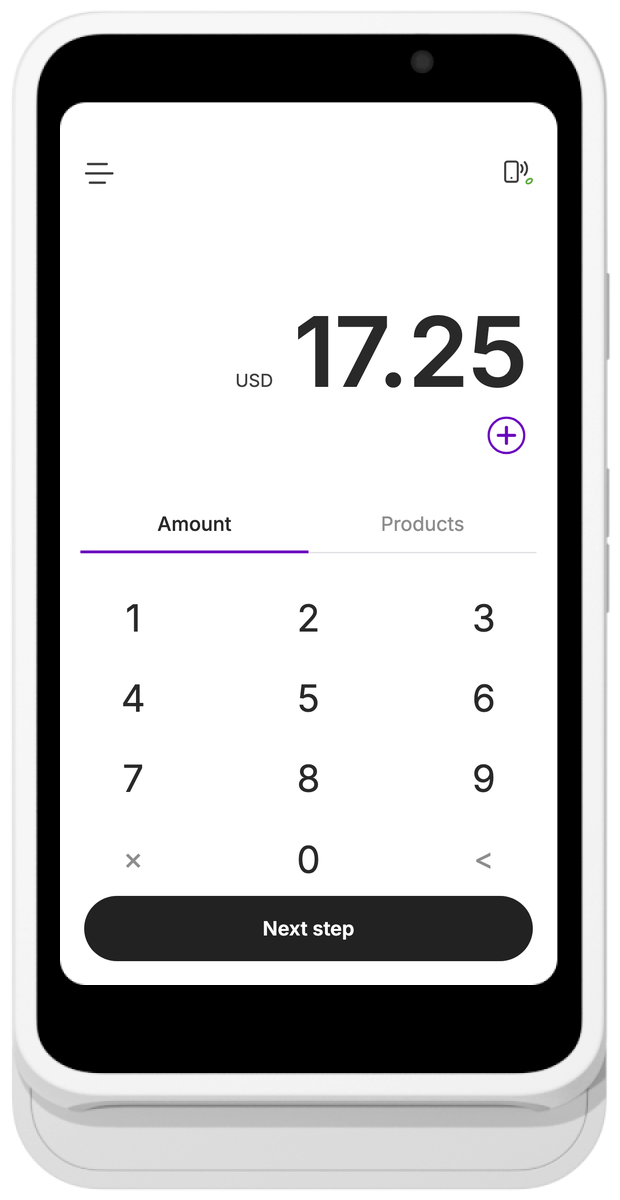
Yes, you can use a Stripe Reader S700 or S710 without a phone: install a payment app that runs directly on the reader, enter the amount on its touchscreen, and the customer taps, inserts or swipes their card on the same device. You have two options: Stripe's own standalone mode, which is in public preview, or Paid, which runs on the reader with a full checkout.
Both work with the Stripe account you already have, and the money goes straight into your Stripe balance.
Why run the reader on its own
The S700 and S710 are handheld terminals with a 5.5-inch touchscreen, Wi-Fi, Ethernet through the optional hub, and about 15 hours of active use on a charge. The S710 adds 4G mobile data. Because they run their own software, they don't need a phone or computer next to them. That suits:
- Shops and cafés that want one device at the counter.
- Staff who take payments at the table or on the shop floor without carrying a phone.
- Businesses that don't want to hand out a phone to every team member.
Option 1: Stripe's standalone mode
Stripe offers a no-code payment app built into the S700/S710 and the Verifone V660p. You turn it on in the Stripe Dashboard and restart the reader. It is in public preview and needs a production reader, not a developer kit.
Standalone mode lets you type an amount, take a card payment and add a tip on the reader. It is deliberately simple:
- There is no product catalog. You type every amount.
- It can't take payments offline.
- Stripe says it is not a point-of-sale system, cash register or fiscal system, and its receipts are card-payment confirmations only.
If you only need to charge a typed amount now and then, it may be enough.
Option 2: Paid on the reader
Paid installs on the S700 and S710 and opens as soon as the reader starts. You get the same checkout as in the Paid phone app:
- Product catalog, so you tap items instead of typing prices.
- Tips and taxes on the reader screen.
- Offline payments. If the internet drops, Paid keeps taking cards and stores the payments on the reader. They are sent to Stripe once the reader is back online. Stripe limits how much you can take while offline, and an offline payment can still be declined later because the card couldn't be checked at the time.
- Team members with roles, at no extra fee.
Paid charges 0.99% per transaction on top of Stripe's standard fees, with no monthly or setup fee. You buy the reader from Stripe.
How to set up Paid on an S700 or S710
- On your phone: download Paid from the App Store or Google Play, open it and connect your Stripe account. If you don't have one yet, you can create it in the app.
- On the reader: turn it on and connect it to the internet: Wi-Fi, Ethernet with the hub, or mobile data on the S710.
- On the reader: swipe in from the left edge of the screen, tap Settings, enter the admin passcode 07139 and tap Generate pairing code. Keep the three-word code on screen.
- On your computer: open dashboard.stripe.com and sign in. In the account switcher at the top left, select the Stripe account you connected to Paid.
- On your computer: go to Terminal → Readers, click Register reader, enter the pairing code and choose or create a location.
- On the reader: restart it. Paid installs and opens on its own, which can take a few minutes. Sign in and take your first payment.
Register the reader to the same Stripe account you use in Paid. Otherwise Paid won't open on the reader. The S700/S710 page has the same guide with screenshots and troubleshooting.
Standalone mode vs Paid at a glance
| Stripe standalone mode | Paid on the reader | |
|---|---|---|
| Status | Public preview | Available now |
| Enter an amount and take a card | Yes | Yes |
| Product catalog | No | Yes |
| Tips | Yes | Yes |
| Offline payments | No | Yes |
| Also works from a phone | No | Yes, with the Paid app |
| Team members with roles | Not listed | Yes |
| App fee | None | 0.99% per transaction |
Both use Stripe's standard in-person pricing for the card payment itself.
The same works on the T600, V660p and UX700
Paid runs the same way on three other internet readers. The Stripe Reader T600 is a countertop terminal with an 8-inch screen for a fixed register. The Verifone V660p adds a built-in receipt printer. The Verifone UX700 is a self-service reader for kiosks, vending and other places without staff. Setup is the same pairing code, register and restart. Not sure which one fits? Try the reader finder.
Prefer to use a phone sometimes?
You don't have to choose. The S700 and S710 also work with the Paid app on your iPhone or Android phone: you enter the amount in the app and the customer pays on the reader, as with a Bluetooth reader. Your phone and the reader need to be on the same network.
Frequently asked questions
Can the Stripe Reader S700 work without a phone?
Yes. With Paid installed on the reader, or with Stripe's standalone mode turned on, you enter the amount on the reader's screen and the customer pays on the same device. No phone or computer is needed once it is set up.
Is there a difference between the S700 and S710 for this?
No. Both run Paid the same way. The only difference is that the S710 can also connect over 4G mobile data, which helps where there is no Wi-Fi. See S700 vs S710.
Why doesn't Paid open on my reader after I restart it?
Make sure the reader is registered to the same Stripe account you use with Paid and that it is online. Leave it on power for a few minutes so it can download Paid, then restart it again.
Can I take payments offline on the S700 or S710?
With Paid, yes. Payments are stored on the reader and sent to Stripe when it reconnects. Stripe limits how much you can take offline, and an offline payment can still be declined later. Stripe's standalone mode doesn't support offline payments.
How much does it cost?
You pay Stripe's standard in-person fee for each payment. Paid adds 0.99% per transaction, with no monthly or setup fee. Stripe's standalone mode has no app fee. The reader itself costs $299 in the US, £229 in the UK or €259 in Germany, France and Ireland, excluding VAT.